Bulk Download Any Images in One Click.
PicStream is a free, powerful bulk image downloader for Windows — built with NLP-enhanced search and async downloading for lightning-fast results.
Whether you're a designer, researcher, or content creator, collect high-quality images from the web in seconds — no one-by-one clicking ever again.
Trusted & Verified
Loved by creators, researchers & designers
Scanned & Verified Safe
0 threats detected · 100% clean
Open Source on GitHub
LockandOpen / PicStream · MIT
No Login Required
No data collected · No telemetry
PicStream saved me hours of manual downloading. I scraped an entire reference library in minutes!
Riya S.
UI/UX Designer
As a researcher, I need bulk image data. PicStream's NLP search makes finding exactly the right images trivial.
Arjun M.
ML Researcher
Incredibly fast. Downloaded 300+ product images in one go for my e-commerce project. Highly recommend.
Priya K.
Content Creator
Why PicStream?
Powerful Features
Everything you need for seamless bulk image downloading, built into one desktop application.
Natural Language Processing
For better image results. Search intuitively and get exactly what you need.
Easy Downloads
Simple and fast downloading process. One click to get your entire collection.
Platform Availability
Optimized and fully available natively on Windows environments.
User Experience
Designed for a seamless user experience, keeping your workflow uninterrupted.
High-Quality Visuals
Gather large sets of high-quality images, perfect for data analysis and model training.
Intuitive Interface
Enjoy a clean and user-friendly interface that makes image downloading a breeze.
Watch the Introduction to PicStream
See how PicStream simplifies bulk image downloading in this quick walkthrough video.
Ready to Download?
Download the latest version of our software from the Lock and Open GitHub repository. Follow the installation steps carefully to get started.
Download PicStreamDownload the Installer
Click the green button above to download the ZIP file containing the installer.
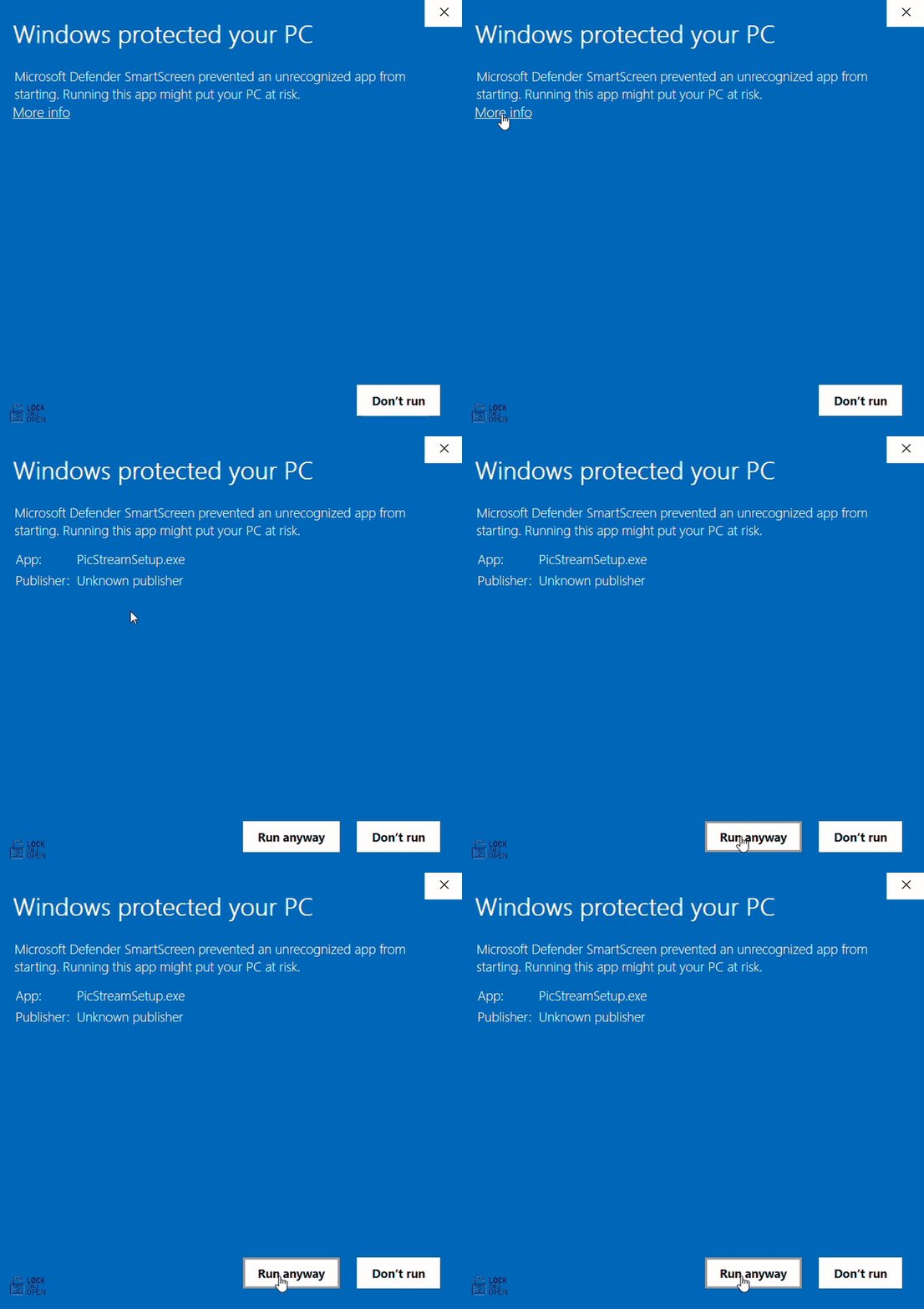
Handling the Security Warning
If you see "Windows protected your PC", click on More info and select Run anyway.
Dealing with Antivirus Blocks
Your antivirus may block the installer. Open your antivirus quarantine section to allow it.
Lock and Open: A Fresh Community
Currently, as a growing community, we cannot afford a formal coding certificate. Because of this, you may face an Unrecognized Publisher issue or antivirus warnings when trying to install our software.
Completely Safe
But don't worry—our software is completely safe! Just follow the instructions to successfully install 'Lock and Open'.
Why This Happens?
Some systems flag software as unrecognized without a costly certificate. We are actively working towards obtaining one. Thank you for your patience and understanding!
Antivirus specific guidance
The following videos offer practical tips and strategies for effectively managing blocks in your specific antivirus software.
For Avast
Learn how to safely add an exception in Avast to allow PicStream to install.
For McAfee
Learn how to safely add an exception in McAfee to allow PicStream to install.
For Norton
Learn how to safely add an exception in Norton to allow PicStream to install.